Field guide  Setting up the nodes

Five ways to run
the lab in Resolve.

The last guide covered what lives inside PhotoChemist: the sliders, the film science, designing your own stocks. This one is about the part everyone asked for next, how you actually wire it into a node tree and grade with it.

4.5 primary workflows Mono-node to full digital intermediate A 100-year-old lab, modelled honestly

00 The mental model

Film is not graded. It is developed in a lab.

In a normal digital grade you work backward from the display. PhotoChemist asks you to think forward through chemistry instead: the values coming in are a frozen impulse of light, and the node simulates what film would have done with it.

The digital habit

Work backward from the monitor.

Camera log lands as RGB triplets. An input transform brings every clip into one working space so lift, gamma, gain, curves, qualifiers and power windows all feel consistent. Then an output transform, a CST, OpenDRT or a print LUT, crushes it down to the display. You define the endpoint first and build back toward the shot.

The PhotoChemist rethink

Work forward through the chemistry.

Treat the incoming values as light hitting a camera negative. Expose the silver layers, develop the negative, push printer lights through the developed stock to expose a print, develop the print, then project it. Everything you do before the node is solving it on set. Everything inside is the lab.

Sceneon set · lens · lights · balance
Camera negexpose the silver layers
Developturn activation into dye
Printer lightsR/G/B valves through the neg
Printexpose + develop print stock
Projectionbulb subtracts to your eye
Choose this first

The final image is a subtraction from the projector light you pick. A warm carbon arc bulb and a neutral xenon give you two different images from the same grade, because you are subtracting from a different quality of light. Choosing the bulb is as consequential as choosing your DRT, so choose it early.

Commit these too

Before you time a single frame, three fixed choices bracket the whole pipeline: your camera negative stock, your print stock, and the development controls (bleach bypass, developer push, and the rest). Pull them from the presets or design your own in the stock editor. Like the projector bulb, these set the in and out points that everything else is subtracted from, so lock them before you start grading.

Detailed guide · choosing and designing stocks→
01

Workflow Mono-node

Neg to Print · one node

One node is the whole lab.

Conform the footage to linear, keep its original camera primaries, and a single PhotoChemist node runs the entire chain: expose, develop, print and project. This is the classical color-timing position. Your one grading control is printer lights: picture light passing through dichroic filters that split red, green and blue, each opening and closing like a valve. Lock your stocks, then grade in printer points.

Node treeconform → PhotoChemist (Neg to Print) → display
Conform · Linear
15fx
on-set fix
PhotoChemist
01fx
Neg to Print
Display out
outfx
Scene Camera neg Develop Printer lights Print Projection

Every lab stage, packed inside one node.
02

Workflow PL Injector

Mono-node · external printer lights

Grade the printer lights without touching the node.

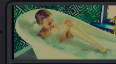
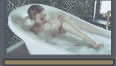
Same mono-node, but you would rather not open PhotoChemist every time. A PL Injector node, plus a power-window node beside it, generates a feed that PhotoChemist reads exactly as if you had moved the printer lights inside. Now your panel, qualifiers and power windows all drive real printer-light modulation: brighten the bathtub, place a skin tone, ride the gain, all still expressed as printer points.

Node treePL Injector + power window → second input of the mono-node
PL Injector
08fx
Printer lights · window
14fx
power window feed
→ PhotoChemist 2nd input
PhotoChemist
01fx
Neg to Print
Display out
outfx
Scene Camera neg Develop Printer lights · driven externally Print Projection
Still timing

You have not left color timing yet. You are still working printer lights to build the positive print, you have just given yourself a friendlier surface to do it on. Think of it as workflow 1A.

03

Workflow The Sandwich

Neg → grade → Print · digital intermediate

Grade in the middle, between the neg and the print.

Two matched PhotoChemist nodes wrap a normal grade. The first is set to Neg Scan. Film Negative Space converts that scan into a gradeable positive, a cineon log-ish image you can push with ordinary tools. You do your work in the middle. A second Film Negative Space flips digital back to negative, and the last node prints. The two conversion nodes are fully invertible no-ops, so the negative and print stocks stay committed while you grade the digital intermediate exactly where a colorist historically sat.

Node treeNeg Scan → FNS Neg to Digital → grade → FNS Digital to Neg → Print Only
NegOnly PC
02fx
Neg Scan
Neg › Digital
03fx
FNS · invert
Grade · your work
11fx
DI · normal tools
Neg › Digital
04fx
FNS · fold back
Print Only PC
05fx
Print Only
Neg Scan Invert to DI Grade here Fold to neg Print
The choices are locked

The negative was chosen on set, the print stock was chosen after. Your job is the part in between: grade the intermediate and get the best possible image, without ever reopening the stocks.

04

Workflow Digital to Print

No negative · print side only

No negative at all. Just borrow the print.

Take your conformed DaVinci Wide Gamut linear image, invert and prep it with Film Negative Space so PhotoChemist accepts it, then run Print Only. Nothing happens on the negative side. You get print sensitivity, print dye and print H&D, plus printer lights and the projector bulb. It is the same idea as dropping a 2383 print LUT onto digital footage, except it is live and every control is yours.

Node treeDWG linear → FNS prep → PhotoChemist (Print Only) → display
Conform · DWG linear
16fx
any digital image
Neg › Digital · prep
06fx
FNS · into print space
Print Only PC
07fx
Print Only
Display out
outfx
Camera neg Develop Scan Printer lights Print Projection

The physical analog is a film-out: a digital master recorded to negative purely so it can be printed.

05

Workflow Neg to Digital

Shoot film · finish modern

Shoot film, finish digital.

Keep the authentic negative and its grain, halation and layer crosstalk. The first node is set to Neg Scan. Film Negative Space inverts neg to digital into a cineon-log positive, you grade in the middle with normal Wide Gamut controls, then hand off to OpenDRT as your display transform. Shape the intermediate so it reads to OpenDRT like DaVinci Wide intermediate, and out you go. It is the mirror image of the print workflow: real film capture, modern digital finish. Swap OpenDRT for a 2383 print LUT any time and nothing about the approach changes.

Node treeNeg Scan → FNS Neg to Digital → grade → OpenDRT
NegOnly PC
13fx
Neg Scan
Neg › Digital
09fx
FNS · invert
Grade · your work
12fx
DI · normal tools
OpenDRT
10fx
display transform
Camera neg Develop Neg Scan Grade here Print Projection
Get them talking

The trick is matching the handoff. Shape the scan so its contrast sits where OpenDRT expects DaVinci Wide intermediate, roughly the bulk of the image between 20 and 60 on the scopes. Once the two talk to each other cleanly, commit the negative and the DRT, and grade in the middle.

In short The through-line

Once the negative, the print and the projector are defined, do not change them. Grade in the middle.

That is four and a half ways to honor a photochemical system that ran for a hundred years before any of this went digital. Use only the print side. Use only the negative side into OpenDRT. Put both together and grade the intermediate. Run a pure mono-node, or a mono-node driven by your own printer-light rig off to the side. Anything you do before PhotoChemist is answering one question: what if something had changed on set?

PhotoChemist · dec18 studios Tools suite · $47.34 · one year of updates Free Lite edition on the site and in the plugin manager